Stitch by Stitch: Building an Ocean in the Berkshires

Imagine walking into the ’62 Center for Theatre & Dance and finding yourself underwater surrounded by waves of vibrant coral, not in glass tanks, but crocheted by hundreds of hands across the Berkshires. This isn’t a fever dream. It’s the Berkshires Satellite Reef project, and it’s growing one loop at a time.

Worldwide Crochet Coral Reef

Worldwide Crochet Coral Reef

Williams College is diving headfirst into the worldwide Crochet Coral Reef project, a global, art-meets-science extravaganza designed by sisters Christine and Margaret Wertheim of the Institute for Figuring. This isn’t just art for the sake of beauty (though trust me, it’ll be stunning). This is art with a purpose, spotlighting climate change, celebrating mathematical forms, and building community all at once.

What’s a Satellite Reef, Anyway?

Participants working to craft the reef.

Participants working to craft the reef.

Glad you asked! The Berkshires Satellite Reef is our community’s personal contribution to this worldwide coral constellation. Over the next year, students, faculty, staff, and neighbors will come together to crochet corals of all shapes, sizes, and textures, using yarn, plastic bags, fabric scraps, and whatever else we can loop together.

In Spring 2026, these tiny textile ecosystems will unite as one immersive installation right here at Williams. Picture it: a fiber-optic reef you can wander through, crafted by hundreds of hands, from campus crochet circles to weekend workshops across Berkshire County.

No Crochet Experience? No Problem!

Instruction on how to crochet.

Instruction on how to crochet.

Whether you’re a seasoned stitcher or someone who’s never touched a crochet hook (hi, that was me), we’ve got you covered! Join one of our Coral Crochet Workshops and learn the basics, no experience required. You’ll get a free kit with yarn, a hook, and instructions (and maybe a super cute bag to hold it all). Or drop in for one of our Coral Crochet Circles and stitch alongside fellow reef-makers.

It’s low-pressure, high-reward. You’ll learn something new, meet great people, and contribute to something way bigger than yourself (literally, it’s life-size!). And your name will be in the credits for the installation.

Sustainable Stitches: Crafting with Care

53 pounds of yarn

All yarn was either donated or purchased as upcycled materials from the Old Stone Mill Zero Waste Maker Space

Here’s where it gets even cooler: this reef isn’t just about raising awareness, it’s about doing something. We’re experimenting with sourcing materials that are eco-friendly or upcycled (think yarn remnants, old plastic bags, strips of sheets, even industrial shrink wrap from commercial pallets). Our Makerspace and FabLab are testing out how to turn industrial shrink wrap, police caution tape, and packaging tape, and bulk sized cereal bags into crochet-ready materials. Who knew that caution tape and shrink wrap could become sea anemones?

Get Involved: Be Part of the Reef

  • Learn to Crochet: Join a workshop and get your free kit.
  • Crochet at Your Own Pace: Make corals at home, in circles, or with friends.
  • Donate Materials: Yarn, hooks, plastic bags: we’ll take ‘em!
  • Drop Off or Mail Corals: Send your creations to campus by March 1, 2026.

For specific details, please view our Berkshires Satellite Reef website, this instructional video (How To Crochet A Hyperbolic Plane), or these PDFs:

Can You Use a Laser Cutter to Create Silk Screen Templates?

Ever wanted to reuse your old silkscreen without first having to clean off the old paint or emulsion? This innovative process explores reusing a stainless-steel screen by applying new acrylic paint to the screen to create a solid resist, and then, after the paint dries, removing sections of the resist with a laser engraver. This method has the potential to be a more efficient way of creating intricate and customizable screen printing designs, with substantially less prep work. 

Inspired by Carleton College’s Makerpedia, this method turns traditional screen printing on its head.
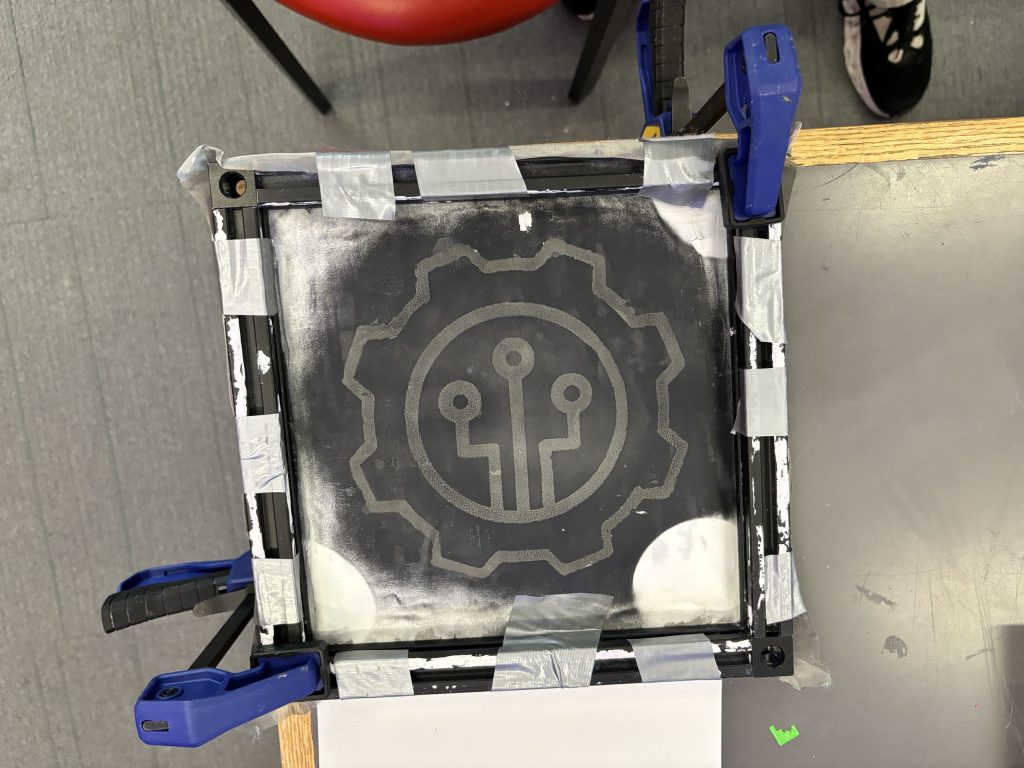
The result of using a laser cutter to burn acrylic paint off of a painted steel mesh screen. Instant "silk screen". Or is it?

The result of using a laser cutter to burn acrylic paint off of a painted steel mesh screen. Instant “silk screen”. Or is it?

Here’s Why this Rocks

  • Reuse it like a pro: Say goodbye to one-and-done screens. 
  • Freedom to create: Change designs as easily as switching out the acrylic paint resist. 
  • Laser precision: Get ultra-detailed results with modern tech. 
  • Perfect for small batches: Quick, easy, and ideal for mini-projects.

How to Make It? (The Fun Part)

I consulted with David Keiser-Clark, Makerspace Program Manager, and Jason Mativi, Senior Science Center Shop Engineer.

Step 1: Make The Frame

To make the project successful, I had to make a frame for the steel mesh. I learned how to use a metal chop saw in the Science Shop to cut the aluminum extrusions to the desired lengths. Before cutting the aluminum, I made sure to wear safety goggles and to clamp the stock down. I then carefully measured and cut a total of four pieces of aluminum.

I used the corner bracket cube to serve as a connector between the aluminum frame pieces, and screwed each side tight to prevent any wobble. 

Step 2: Attach the Screen

I then modified and customized Carleton College’s 3D screen lock. I added more thickness in the base of the screen lock and included holes on each end for the screws to pass through. Each hole has a diameter of 0.27 in.

I cut enough screen mesh to wrap over both ends of the frame. I then had to make two holes on each side of the screen and attached it as tight as possible to the extruded part of the frame. I added the screen lock, pressed, and secured it in place with a screw.

Step 3: Painting the Screen

I painted the mesh of the screen with a solid coat of acrylic paint. I found that painting one side of the screen is sufficient.

Step 4: Printing Process
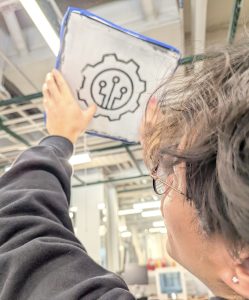
Stephen Sabio '28 examining the first attempt to use the laser engraver to do a reusable skill stencil.

Stephen Sabio ’28 examining the first attempt to use the laser engraver to do a reusable skill stencil.

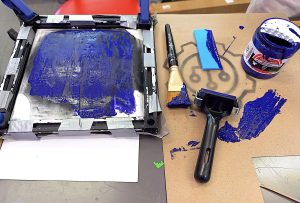
I placed the screen on top of white drawing paper, with the screen facing the paper. Then, I made sure that it was secured so that it would not move as I applied fresh paint. I used around 10 ml of paint and painted it over the screen nice and slow to make sure that it didn’t bleed. I used the silicone squeegee to apply the paint evenly on the screen. Lastly, I slowly separated the screen from the paper. It was a little sticky, so I had to be careful not to smudge the paint. Sticky? Yes. Smudgy? No.

I may not have successfully created the perfect silkscreen. I think what I learned here is patience. Everyday I learn something new. It is not always about the goal. I was initially so focused about creating the perfect mesh screen, but I think the best part here was the process of figuring out how to make this work the way I wanted it to work. I learned that the beauty of creating something isn’t the result. It is every step you take, every turn of the screw, every laser that passes through, every stroke of the paint. It is those little pieces of an art that makes it a whole.

How Many Times Did I Fail? (A Love Letter to Iteration)

Spoiler alert

It wasn’t perfect the first time.
Or the second.
Or… well, you’ll see.

Unfortunately, we broke the auto-focus plunger (which we don’t use) on the laser engraver, because we set the height for the recessed screen and failed to account for the taller aluminum frame. Collision! (Sorry Mativi!!!) On the positive side, when the new part arrived, we learned how to repair the laser engraver.

Iteration #1: The first attempt of using the laser engraver to burn a precise design in the mesh screen, I set the power to 26% and the speed to 100%. I repeated this process three times to try and burn through the acrylic paint on the mesh. It didn’t work. The screen was still covered with acrylic paint on the other side of the screen. Epic fail. Paint didn’t budge.

Here’s what I learned: there’s no need to paint both sides of the mesh screen, as that only makes it more difficult to burn the paint off with the laser engraver.
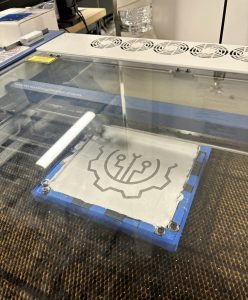
The laser engraver’s first run, etching precision into motion. #Laser engraver in action!
The laser engraver’s first run, etching precision into motion. #Laser engraver in action!

Round two of testing: despite multiple burns, the acrylic paint refused to give in.

Round two of testing: despite multiple burns, the acrylic paint refused to give in.


Iteration #2: I next set the power to 100% and the speed to 100%. I again repeated this burn three times. It didn’t work. The screen was still covered with acrylic paint on the other side.

Bright side? The laser survived!

Iteration #3: Third time’s a charm, they say. I set power to 100% and the speed to 100%. It was basically the same as the second iteration, but this time instead of passing the laser engraver thrice, I passed it five times. The screen was still covered with acrylic paint on the other side but this time the acrylic was brittle and I was able to remove it using a razor blade and a steel brush. I gently took off all the brittle dried acrylic from the screen. The design survived. It worked! Oops! A new problem: applying fresh paint to the mesh screen results in paint bleeding out around the design borders. The print quality is terrible. There is still something missing. What’s next? I don’t know! Guess we will keep trying. 
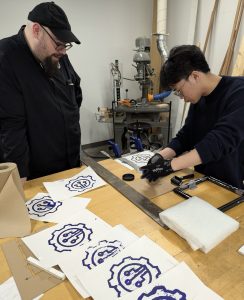
A test for new solutions: Jason Mativi and Stephen Sabio experimenting with alternative methods after multiple laser engraving challenges.

A test for new solutions: Jason Mativi and Stephen Sabio experimenting with alternative methods after multiple laser engraving challenges.

Iteration #4: A recurring problem that I have identified is that the acrylic paint is challenging to burn away using the laser engraver. It’s time to try an alternative method. Mativi recommended that we try using the water jet to burn away the acrylic paint. So, I went to the Science Shop. And voilà, the water jet cut through both the acrylic paint and the mesh screen. The 30,000 psi water pressure and garnet dust was too strong for the screen material. We initially thought that might occur, but hey, at least we tried! 

Iteration #5: Back to the laser engraver. We tried experimenting around the speed and power of the laser engraver. There was no optimal speed and power to completely get rid of the acrylic. However, 100% power and 30% speed almost achieved our desired result. I still had to scrape a little bit of the acrylic off the screen. It was still worth the try!

Finally, it did work on iteration 5! Now, the big question: How many times did I fail? To be honest, I don’t know. I lost track along the way. The important thing is, I, we did it
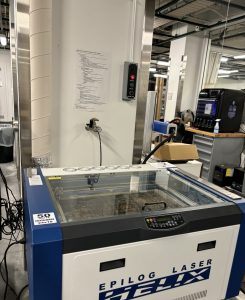
When the backup fails ( water jet), it is time to go back to the original plan of the laser engraver and try again
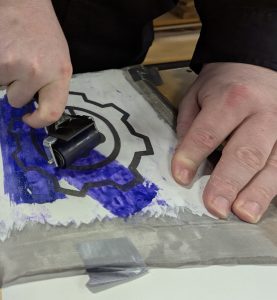
When the backup fails ( water jet), it is time to go back to the original plan of the laser engraver and try again

After multiple attempts, there was success! Next came printing - an extremely careful process of separating the screen paper with little to no smudges.

After multiple attempts, there was success! Next came printing – an extremely careful process of separating the screen paper with little to no smudges.


Result? Fabulous

But more than just a crisp print, what I really took away from this process was growth. Every failed iteration, every broken tool, every “oops” moment pushed me to adapt, experiment, and stay curious. I didn’t just build a reusable mesh silkscreen—I built patience, problem-solving skills, and a deeper appreciation for the messy magic of making.

The learning process gave me hands-on experience with precision measurement, power tools, and mechanical assembly. I learned how to safely operate cutting equipment, interpret dimensions with accuracy, and ensure structural stability by aligning components tightly. It also sharpened my understanding of engineering tolerances; one loose screw, and the whole frame can wobble!

Beyond just assembly, this part of the process also introduced me to the practical side of design thinking, understanding how each material interacts under tension, and how even minor tweaks to the build can affect the outcome of the print. Turns out, there’s a bit of an art to building things that don’t fall apart under pressure. Literally.

Materials List

  • Stainless Steel Mesh
  • Aluminum Extrusion
  • Silicone Squeegee
  • Acrylic Paint
  • Screen Printing Ink
  • Corner Bracket Cube (20x20x20mm)
  • Dimensions; 8.625 in x 8.625 in

Preserving History: How I used 3D scanning to preserve an ancient cuneiform tablet

I have always been someone who is interested in different languages. My passion sparked when me and my family moved to the United States from Venezuela, and I needed to learn English fast to help my family navigate this country, since they had less time to learn English than I did. Although I didn’t have an English tutor to formally teach me English, I taught myself most of my English through reading, which made me develop a love for languages in written form. Now, at Williams, I am a prospective Chinese Language major because I fell in love with the language after taking CHIN 101! So when I was given the opportunity to work on a project that was so related to my interest in languages, I jumped on it immediately.

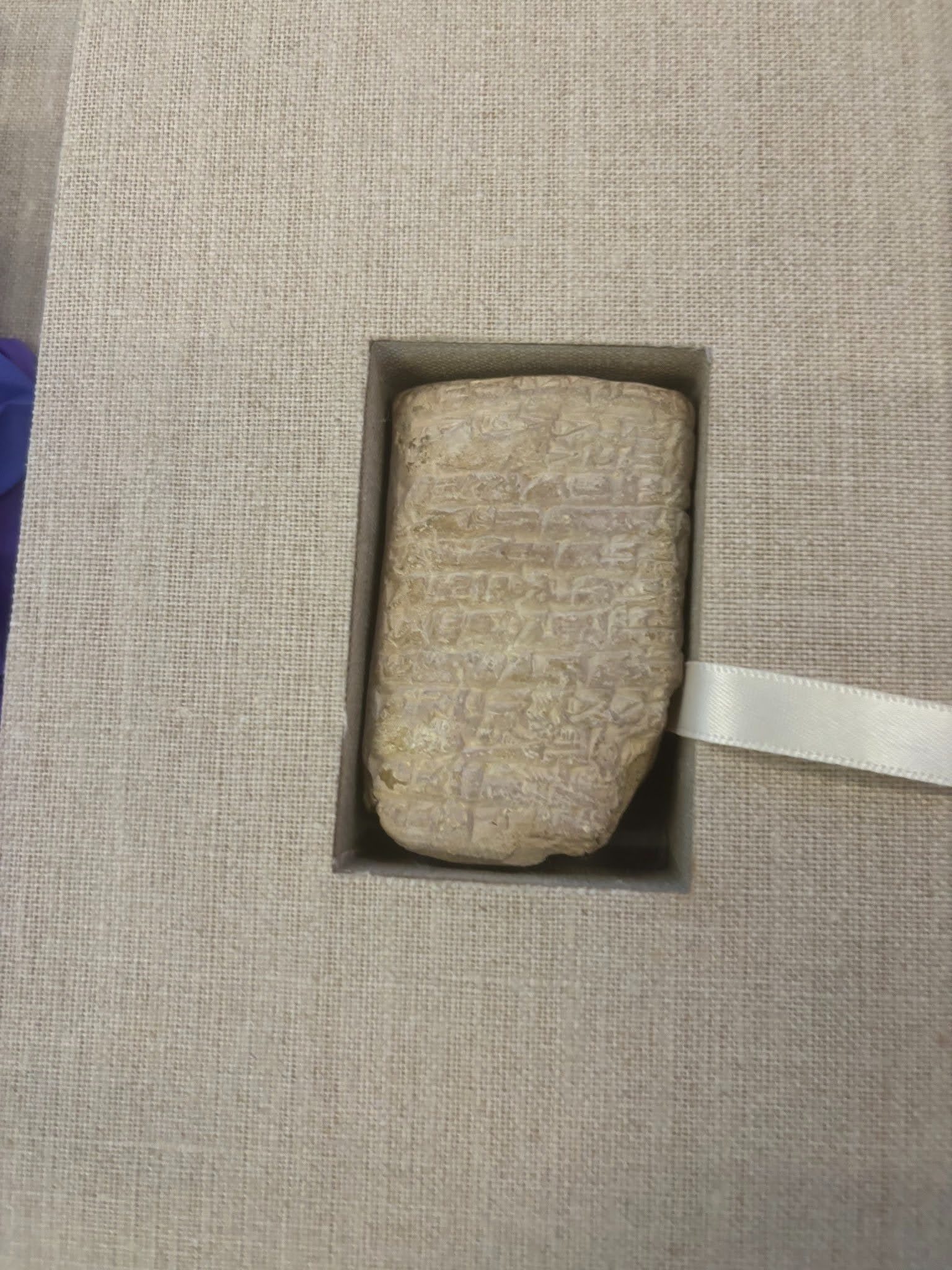
Cuneiform is regarded as the earliest known writing system. These words are written into clay and then baked into a sturdy, but fragile tablet. I was also really surprised to learn that cuneiform was used to write several languages. I had the pleasure to work with When we got to work, I was filled with excitement, but also some anxiety about the unknowns. Anne Peale, a librarian that works closely with the college’s special collections. She taught me that this particular cuneiform tablet was (insert interview details here). She plans to use the 3D printed tablet for educational purposes, because the characters in the tablet are very legible and hold information about a person’s taxes. Not only would 3D printing the cuneiform tablet allow several iterations of it to be used outside of the special collections library, it also allows us to make the tablet bigger, which makes the writing a lot easier to read. I was really excited about all of this, and it honestly made me want to learn how to read this type of cuneiform!

When we got to work, I was honestly really nervous. I didn’t know what to expect. This project required a way to record the tablet’s intricate wedges and patterns in a way that makes the writing completely legible, so we decided to use the unfamiliar Creality scanner to 3D scan the cuneiform, digitizing it into a file form. In my opinion, the Creality software was really intuitive. It was fairly easy to connect it to the computer, and to figure out how to correctly configure the scan. The most challenging part of this project was figuring out how to scan the tablet in a way that fully recorded the writing. We had some challenges with this, as the most detailed scanning mode included stickers that told the scanner its location, and since we couldn’t place the stickers on the cuneiform, we had to place them in its perimeter, something that became really hard to deal with when we began to turn the scanner sideways to get the sides of the tablet, since it could no longer recognize the stickers due to the angle change. Another challenge we had was that the tablet was really hard to place in a balanced way that didn’t topple over, so we ended up putting a small weighted cushion to hold it up.


Since we couldn’t place the tablet in a way that was possible for us to capture all four sides in one scan, we had to do a scan for each of all four sides. Each side of the tablet took about twenty minutes to complete, and the Creality scanner is really heavy! Anne and I had to take turns scanning, and we were both so sore! Creality records 3D items by scanning each and every point on the item, and this tablet was so intricate that it had over a million points for each side! The more we scanned, the fewer points that were recorded, so we had to go around the item a lot slower and with a lot more complex angles to make sure we recorded every character.

After two hours, all sides were scanned. Now, the only thing that was left was to find a way to merge the different scans into the composite model of the tablet. Although the Creality software comes with a scan merging option, this did not work on our scans, so blender was used to merge it.

After a month, the 3D scanned cuneiform was ready! It was a lot bigger than the tablet, and a lot less fragile, and best of all, we now had a file that could be used for printing as many of these tablets as we want! I was really excited because it was also my first time getting to see a 3D scanned object up close, as well as hold it.

One side of the tablet is clearer than the other, so we are going to reprint the file as a resin print, because the material may help to raise the clarity of the 3D print. 

Working on this project was a true journey of growth for me. The complexity of 3D scanning and the delicate nature of the cuneiform tablet made every step a learning experience. There were moments when I felt challenged, uncertain about the technical aspects or the best way to handle the fragile tablet. But with each hurdle, I gained more confidence, honed my problem-solving skills, and improved my ability to think creatively under pressure. I have always been really interested in languages, and this project sparked an interest in the digital humanities and language preservation.The potential of 3D scanning in the field of digital humanities is endless. From preserving endangered artifacts to making them accessible to scholars and students around the globe, this technology ensures that history is no longer bound by geography or fragility. I couldn’t help but think, what other treasures could we preserve this way?

Making Plastic Yarn from Industrial Shrink-wrap for the Berkshire Satellite Reef Project

Participants in the Berkshire Satellite Reef Project's crochet workshop, led by Led by Rae Bravo ’28, Annie Trucano ’29, and Professor Amy Holzapfel (standing).

Participants in the Berkshire Satellite Reef Project’s crochet workshop, led by Led by Rae Bravo ’28, Annie Trucano ’29, and Professor Amy Holzapfel (standing).

Well, not technically underwater. But when you walk through the main library entrance, you may find yourself surrounded by beautiful crocheted coral pieces. The Williams FabLab was hard at work on Wednesday, October 1st, crocheting hyperbolic corals to contribute to the Berkshire Satellite Reef Project.

The Berkshire Satellite Reef Project was inspired by the worldwide Crochet Coral Reef, a global community art initiative started in 2005 by Australian artists and sisters Christine and Margaret Wertheim. The initiative raises awareness about threats to coral reefs by bringing people together to create art. Here at Williams, participants were invited to the FabLab to learn how to make these pieces themselves. Led by Rae Bravo ’28 and Annie Trucano ’29, each participant received a kit with yarn, a crochet hook, and a hip homemade bag to carry it all in.

Each crochet piece is made with upcycled yarn from community donations. The creations have unique shapes and colors, reflecting the vibrant biodiversity of reefs, which are under threat due to changing ocean conditions from climate change.

FabLab and Makerspace Make Plastic Yarn from Industrial Shrink-wrap

The FabLab and Makerspace collaborated to purchase a functional replica of a Meyer rope making jig. (Martin Meyer of Sheffield, IA, received patent 1,510,691 on October 7, 1924, for a 4-strand hook, non-geared rope machine.) 

We tested our Meyer prototype during the June 2025 Alumni Weekend, where many kids (and adults) had opportunities to cut 18″ wide industrial shrink-wrap into manageable one-inch widths, and loop them onto this hand-crank machine, and crank, crank, crank! Their work caused the four separate plastic loops to twist, until finally the four loops would twine together, creating a reasonably strong braided plastic yarn. We donated this plastic yard (“plarn”) to the Berkshire Coral Reef Project, where people subsequently crocheted it into the hyperbolic coral reefs that will be on exhibition.

Meyer rope jig in use with Ari Merrill '28 holding the ends of the loops of shrink-wrap.

Meyer rope jig in use with Ari Merrill ’28 holding the ends of the loops of shrink-wrap.

A close-up showing the effects of twisting shrink-wrap and how the individual pieces twine into a four-strand plastic rope.

A close-up showing the effects of twisting shrink-wrap and how the individual pieces twine into a four-strand plastic rope.


A special thanks to Amy Holzapfel, chair and professor of theatre and a Gaudino Scholar, for graciously providing the kits and helping bring this project to life.

Read more in The Williams Record about The Berkshire Satellite Reef Project and Amy Holzapfel’s contributions.

Postscript (March 13, 2026)

Exhibition Dates/Hours:
Sunday, April 19 – Tuesday, May 12
Every Day: 10am-4pm
Evenings: Wednesdays-Saturdays, 6pm-8pm
CenterStage, ’62 Center for Theatre & Dance, Williamstown MA