Local ChatGPT: A Board Enclosure for Williams’ Micro AI

Imagine tinkering with a Generative AI. The orthodoxical scenario with Generative AI is that you ask it a question and it gives you an answer. But this time, rather than asking a question, you dictate how it answers the question. Instead of being a mere user, you are the brain behind the AI.

What is generative AI?
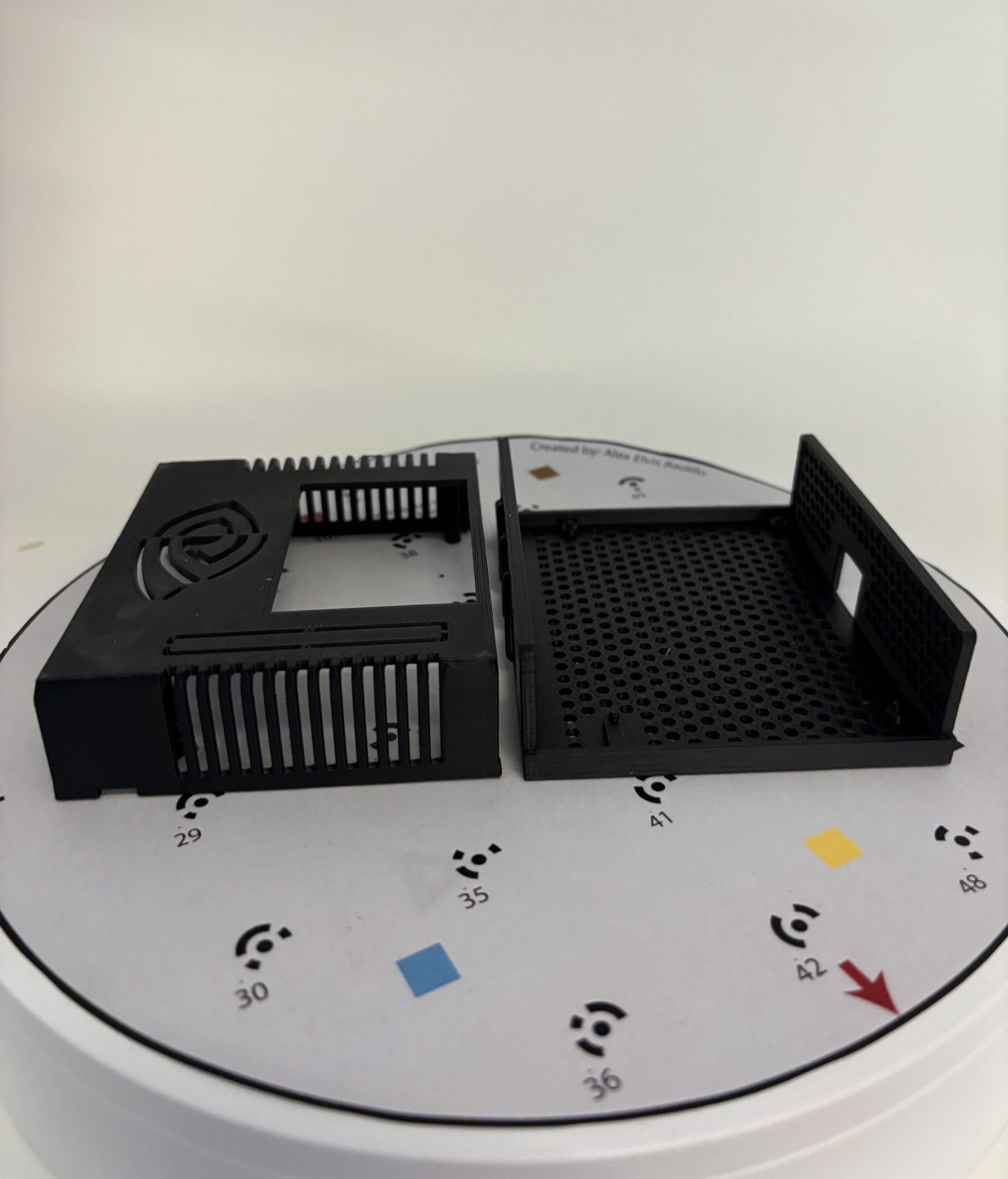
Printed case (using high-temperature ASA filament)

3D printed case (using high-temperature ASA filament)

A type of AI that quickly generates answers, information, and contents based on the user’s variety of input (Nvidia, 2024). It typically has an interface where users can type their inputs. Generally, these models can have text, images, sounds, animation, 3D models, or other types of data as inputs and outputs. 

At Williams, there exists a local generative AI called EphBot. Unlike the mainstream generative AI (e.g. ChatGPT, Gemini) which connect you to a huge database stored in powerful servers, EphBot is a tiny device that can be held in a real person’s hand. The EphBot offers AI for experimentation and exploration while ensuring complete data privacy because it is local and does not interact with the Internet or other databases.

Now what?

The Office for Information Technology (OIT) at Williams College is developing another micro AI just like EphBot. Mr. Gerol Petruzella is an Academic Technology Consultant in OIT and the project developer of the upcoming micro AI called NanoBot. I asked him about the purpose and significance of the project and he responded with, 

“For students and faculty at Williams to explore and experiment critically with generative AI. I believe passionately that all Williams students should have the opportunity to be more than merely users of generative AI applications.”

The NanoBot project is the 2nd anticipated microAI of Williams College. It is a generative AI like ChatGPT and Gemini. However, instead of being just a user, NanoBot gives you the opportunity to experiment on the AI itself.  

Why is it necessary to create a casing for the microAI?

Before I go deeper into that question, let us scrutinize the story from the start. Gerol is+ using the NVIDIA Jetson Nano Developer Kit to create the NanoBot. It is a small AI computer that allows a user to build practical AI applications, cool AI robots, and more. 

“I reached out to the Makerspace because the Jetson Nano Developer Kit provides a bare board, but no case or enclosure,” said Mr. Petruzella.

He noted that the Jetson Nano Developer Kit, which is the NanoBot itself, lacks a protective enclosure to its main body. This would be bad especially for hardware like this that is intended to be presented and used by a variety of people on loan through the Williams Library.

“Since my goal is to develop units which students and others in the Williams community can check out and use, the device needed a case, to make it sturdy and usable (avoiding both damage to the device and harm to the user!)”

Indeed, a protective cover would make the device itself sturdy and also avoid the risk of harming the people that are going to use it. But from what types of harm would the enclosure offer protection specifically?

Physical Protection

If the NanoBot will be used by the public, we cannot deny the fact that accidental bumps, drops, and other physical impacts that could lead to damage are likely to happen. Not to mention dust, dirt, and other particles that can accumulate on internal components and cause malfunctions.

Thermal Management

The enclosure is designed to have ventilation in order to help dissipate heat generated by the hardware, preventing overheating and ensuring optimal performance. By controlling the internal environment, it can help maintain a stable operating temperature for sensitive components.

Electrical Safety

It may be a small device, but it is still powered by electricity. The enclosure can provide electrical insulation, protecting users from accidental contact with live components and reducing the risk of electric shock. The enclosure would serve as the countermeasure and we know that it is better to have a countermeasure than to have a cure for electric related damages. 

You can read more here about enclosures.

Why not just order one online?

“I couldn’t find any commercially-available case for this model, but I did discover a recipe on Thingiverse, so using the resources of the Williams Makerspace seemed like a great solution,” said Mr. Petruzella.

The main objective of this project was to fabricate a cost-effective enclosure for the Jetson Nano Board. Specifically, this project aimed to create an enclosure that can:

  1. Protect the device from physical impacts
  2. Withstand high thermal activities without melting
  3. Serve as an outer insulation for the device 

Printing with ASA Filament

Filament Type: PolyLite ASA

Specification:

  • Print Temperature: 240 – 260 °C
  • Print Speed: 30 – 50 mm/s
  • Bed Temperature: 75 – 95 °C
  • Fan: OFF

Caution

The fumes emitted by the ASA filament can be potentially dangerous when inhaled. It emits a smelly & intense smoke that comes from Styrene present in this plastic compound (MakeShaper, 2020). This fume can cause health issues such as headaches, irritation, and so much more. It is recommended to use a fume extraction system while printing. We used BOFA fume extractors.
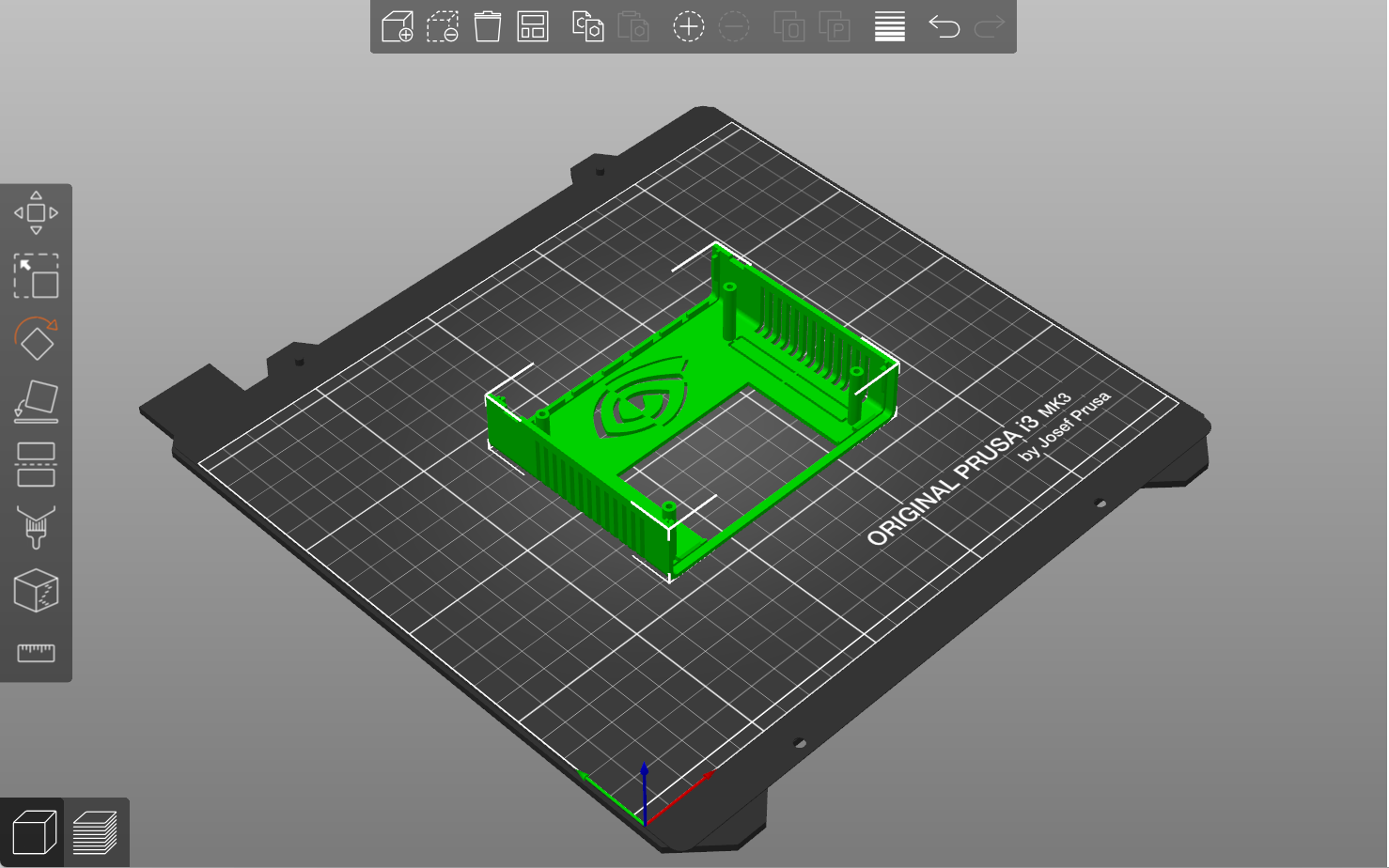
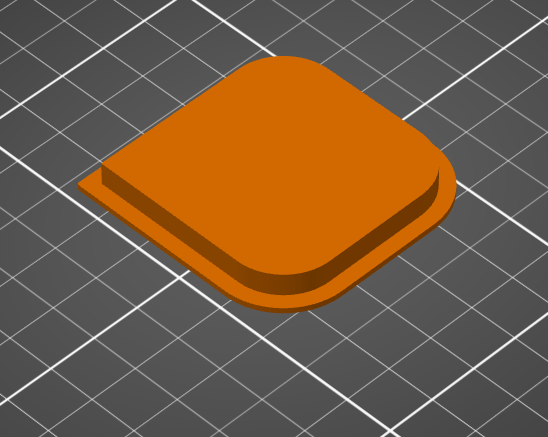
Blueprint of the top enclosure in Prusa Slicer Software.

Blueprint of the top enclosure in Prusa Slicer Software.

Step 1: Acquire the 3D Model of the Enclosure
The 3D model was pre-modeled by Ecoiras in thingiverse. I downloaded and converted it into a file that the Prusa i3 (3D Printer) can read using Prusa Slicer software. You are always welcome to customize your own design.

The Prusa i3 (3D Printer) printing the enclosure.

The Prusa i3 (3D Printer) printing the enclosure.


Step 2: Configure the 3D Printer and Load the Assigned Filament
Then, wait for it to print. It may fail to print sometimes, but it is totally normal for it to fail. Print and print until it succeeds. After it successfully prints the product, slowly scrape it off from the plate from which it was printed.

The NanoBot with its new enclosure.

The NanoBot with its new enclosure.


Step 3: Fit the Finished Product.
This is the finished product. Feel free to change the color if you want. We chose to print this case in ASA filament, instead of the more common PLA filament, because ASA offers a melting temperature that is higher by about 50 degrees Celsius. That means that the heat generated by generative AI computing is less likely to melt the case. 

Community

In this technology-driven time, the generative AI’s performance and popularity continuously rise. It is inevitable as we proceed in times where advancing technology is prominent. NanoBot will empower students and faculty to become active participants rather than passive consumers of generative AI technology.

The NanoBot gives users the ability to transcend the state of being mere users—how do you want to configure AI?

Resources

Nvidia. “What Is Generative AI?” NVIDIA, 2024, https://www.nvidia.com/en-us/glossary/generative-ai/  

MakeShaper (2020). 3D Printing: Understanding more about ASA filament applications. Makeshaper. https://www.makeshaper.com/post/3d-printing-understanding-more-about-asa-filament-applications 

Benchys on Benches and Sailors on Shelves

Using CAD allowed me to model and then print this custom holder for future benchy calibration test prints.

Using CAD allowed me to model and then print this custom holder for future benchy calibration test prints.

The objectives of this project were to 1) build a 3D model and print from scratch to accumulate hands-on CAD and prototyping experience for future modeling and printing projects, and 2) build a practical object—in this case, shelves resting on the windowsill in the Makerspace that can contain and display Benchys—3D boat models used for calibrating and benchmarking 3D-printing performance.

First, I measured the width of the windowsill (1.5”) and dimensions of a typical 3D Benchy (2.5” x 1.25” x 2.0”). Using those measurements, I used the outline and sketch features in the Fusion 360 software to create a shelf exactly 1.5” wide that would sit flush on our windowsill.

The dimensions of the compartment needed to be slightly larger than the dimensions of the Benchy to allow for movement. So, I sketched a rectangle surrounding the perimeters of the Benchy with an additional .25” of room for the width and height to allow for “tolerance” in the geometric dimensioning. I used the “mirror” action in Fusion360 to duplicate the compartments, totaling 4×4 or 16 shelves.

I sketched a blue rectangle with the same length and height as the Benchy: 2.5” x 2.0”. This served as a helpful tolerancing reference.

I sketched a blue rectangle with the same length and height as the Benchy: 2.5” x 2.0”. This served as a helpful tolerancing reference.

I used the “extrude” feature in Fusion 360 to add a width of 1.5” to the original 2-dimensional sketch, thereby transforming it into a 3D model.

I used the “extrude” feature in Fusion 360 to add a width of 1.5” to the original 2-dimensional sketch, thereby transforming it into a 3D model.


Upon completing the 3D model and initializing the 3D printing process, I discovered that the model’s width and height exceeded the dimensions of the standard Prusa 1 MK3S bed. To solve this problem, I could have undergone another remodeling process to fit the dimensions or sliced the prototype and printed it in four iterations. Instead, I printed the original prototype on the larger Prusa XL. Looking forward to future projects, I’ll carefully consider the geometric dimensions of my 3D models relative to the volumetric constraints of the 3D printing devices to ensure successful prints.

Special thanks to Stepher Sabio (’28) and David Keiser-Clark, Makerspace Program Manager, for assisting in the 3D printing process!

Post Script

One year later, my custom storage shelf is happily filled with calibration test prints by our student workers.

One year later, my custom storage shelf is happily filled with calibration test prints by our student workers.

One year later, my custom storage shelf is happily filled with calibration test prints by our student workers.

From Summer Sunshine to STEM Making: Makerspace’s Reflections on a Season of Innovation

Divine Uwimana ’27 and Qi Wang ’26 have an ice cream chat at Spoon Cafe on Spring Street with Makerspace Program Manager David Keiser-Clark.

Divine Uwimana ’27 and Qi Wang ’26 have an ice cream chat at Spoon Cafe on Spring Street with Makerspace Program Manager David Keiser-Clark.

Written by: Qi Wang ’26, Divine Uwimana ’27, Divya Sijwali’ 28.

What happens when you mix a dash of creativity, a sprinkle of STEM magic, and a whole lot of teamwork? Well, welcome to a summer at the Makerspace! Imagine learning how to 3D print parts for a science kit by day and swapping sketches on designs over ice cream by night. 

Divine Uwimana ’27 and Qi Wang ’26 worked in the Makerspace this past summer as student workers. They made significant progress on a Towards Inclusion, Diversity & Equity (TIDE) grant awarded to develop sustainable and reusable STEM learning kits for 5th-grade students in nearby under-resourced elementary schools. 

In the summer, Divine and Qi learned Fusion 360 (computer-aided design software) and advanced 3D printing, including calibrating printers and determining the most appropriate hot-end temperature settings. They identified and associated core curriculum science concepts with their STEM kit models and learned how to use rapid prototyping to test and quickly iterate on conceptual designs. By the end of the summer, they had developed three STEM kit models. Their kits centered on storing variable amounts of potential energy by using 3D printed torsion springs, gravity, and rubber bands. Their goal was for a single set of common parts to support all three models.

What Does Makerspace Mean to Them?

3D printed wind up car with an embedded rubber band power source

3D printed wind up car with an embedded rubber band power source

Divine Uwimana ’27 has worked in the Makerspace since the start of her first year at Williams. Divine believes that the Makerspace has offered her a place to learn and create. She said, “I love seeing the product of my learning, and it’s motivating to know that my summer experience will help elementary students learn.” As a math major, the Makerspace has allowed her to apply her skills in mathematics and be creative with them. She added, “I’ve also learned to pay attention to details and have noticed how you can see a huge difference when you change the smallest detail.” 

While working on this project, Divine felt a deep sense of excitement and responsibility: it was fun to make the kits, but making them for the kids made them more meaningful. Developing these STEM learning kits was a way to blend her skills with younger students’ needs, hoping it would enrich their learning experiences. Every design and every print felt a step closer to making a tangible impact. As she dove deeper into learning Fusion 360 and fine-tuning her 3D printing techniques, she felt a sense of accomplishment in turning ideas into designs and then finally into design models. Seeing the pieces come together was incredibly motivating for Divine; the process showed how small adjustments, like changing the length or thickness of a model or adjusting temperature settings, could make a huge difference in the final print.

The opportunity to work collaboratively in a focused environment manifested several “aha” moments for Divine. She said that the most notable was having first-time opportunities to assemble a mechanical Scotty dog kit (created at Carnegie Mellon University’s TechSpark Makerspace), a 3D printer enclosure kit, a wall-mounted tool rack, and a DeWalt shop vac. These assembly projects helped Divine conceptualize pieces that go together. It also helped her learn how to approach designing her own STEM kit models.

3D printed gravity-powered car

3D printed gravity-powered car

Qi Wang ’26 started working in the Makerspace this summer. She appreciates the existence of the Makerspace at Williams because of its real-world application. She said, “Williams is a liberal arts college but also very prestigious. The courses here often are very theoretical, while internships trend towards being pre-professional. The Makerspace is a rare space in between these extremes.” As a comparative literature major, she recognizes that Williams’ courses focus on literature critiques rather than creative writing. The Makerspace offers a space for applied hands-on academic work that requires learning how to research and implement STEM concepts while utilizing her creative writing and thinking skills. Qi found this summer work filled a gap that had been missing in her education at Williams.

Qi also points out the invaluable opportunity of full-time summer work in the Makerspace. She said, “During a typical semester, you see progress only after many weeks because you can only work for at most 20 hours a week as a student worker, compared to the summer, where we have been working 40 hours a week. I feel really good about our summer project in the Makerspace because we’re seeing so much success in just over nine weeks of work.”

Qi believes that the connection between Comparative Literature and the Makerspace is a blend of storytelling and science, like finding the plot twist hidden in a machine or crafting a narrative around STEM. In Comparative Literature, she’s used to dissecting stories, examining themes, and understanding every word’s purpose. At the Makerspace, Qi found herself bringing that same attention to detail and creativity to projects, as if each STEM kit was its own story waiting to unfold.

Creating STEM kits is like crafting a hands-on narrative for the elementary students who will one day use them. Just as she analyzes texts to bring out underlying meanings, Qi digs into her projects with a literary eye—considering how each part fits, how each mechanism flows, and how a simple change in design can rewrite the entire “storyline” of a STEM model. The Makerspace offered her a refreshing new way to put her analytical mind to work, letting her blend the theoretical with the practical and transform her love for literature into a hands-on learning journey.

How Was Their Experience Working Together?

Qi believes that working with Divine has been one of the best teamwork experiences she has had at Williams. She said, “We each have our strengths and have learned how to contribute our ideas to each other’s established work. People often love to give advice, but we’ve figured out how to have our advice add value to our ongoing work.” 

“I’ve also enjoyed working on these kits with Qi and learned a lot from her,” Divine said. “She was always willing to help and provide me with honest feedback. She always had a positive attitude and always made the working atmosphere fun and motivating.”  

In the fall semester, they will hand off their work to two first-year students to develop it further. Divine said, “I am looking forward to seeing the impact of our work and to hearing feedback from both students and teachers at the Pownal Elementary School.” 

Alumni Reunion Weekend at the Makerspace

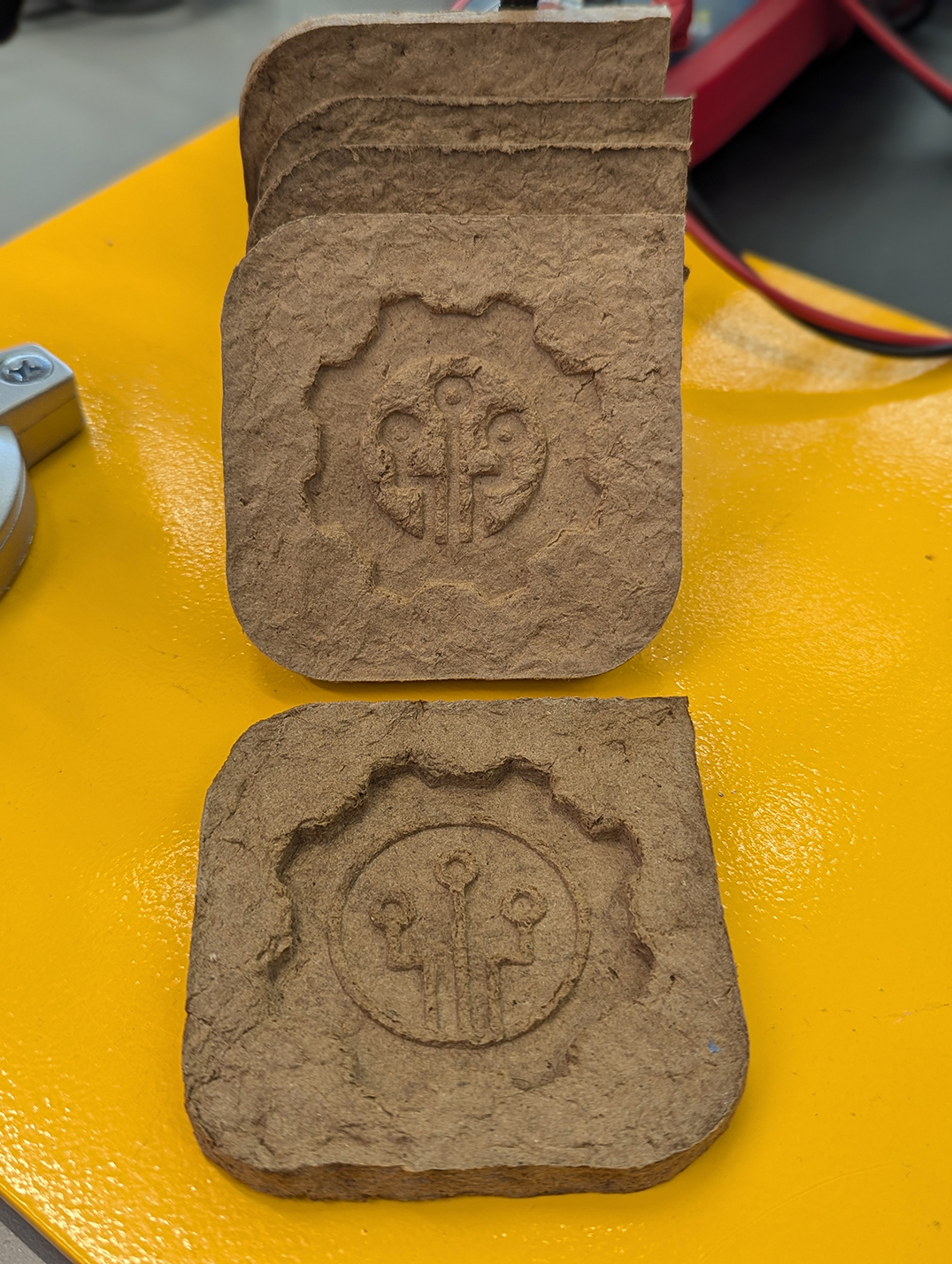
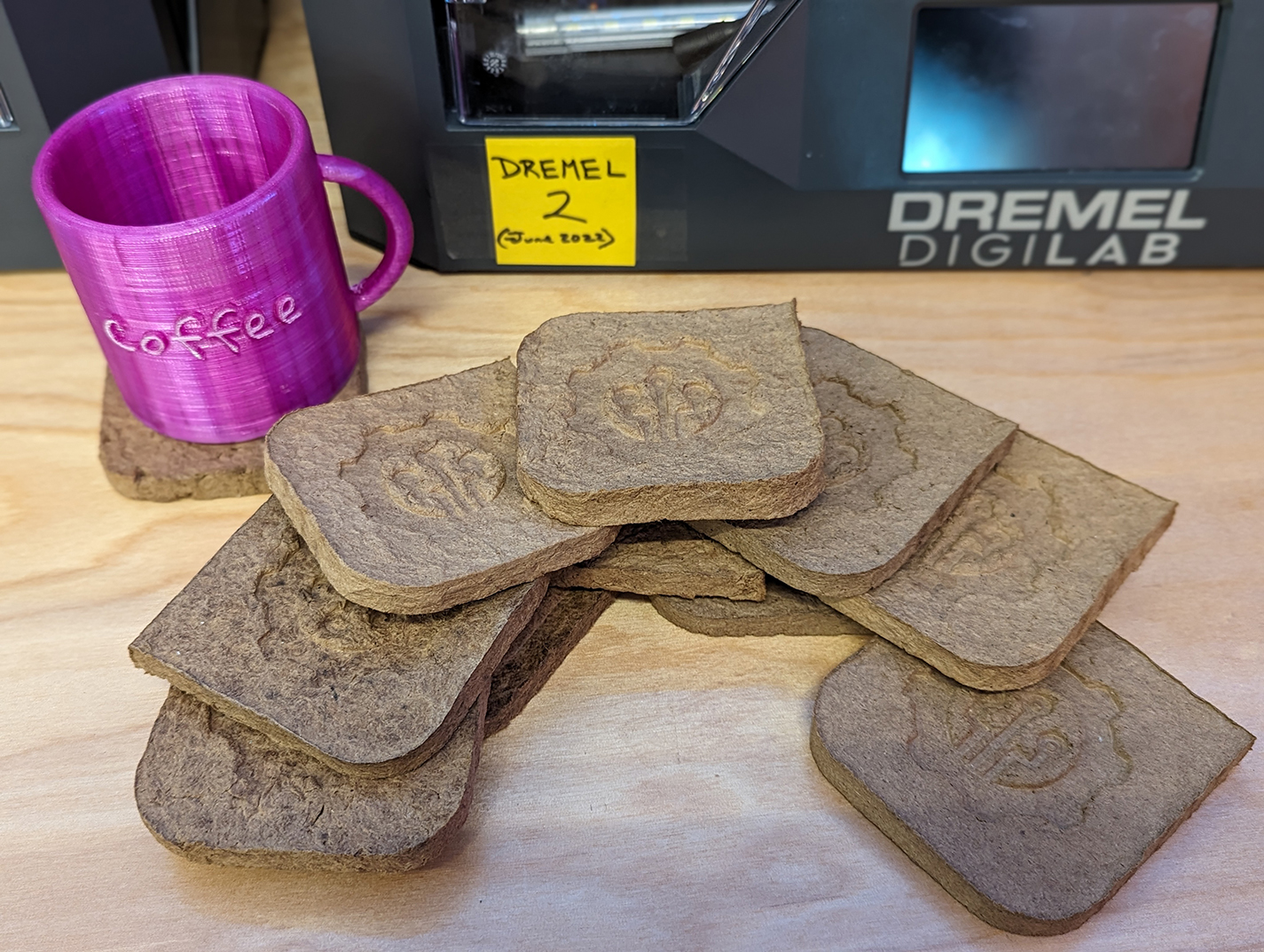
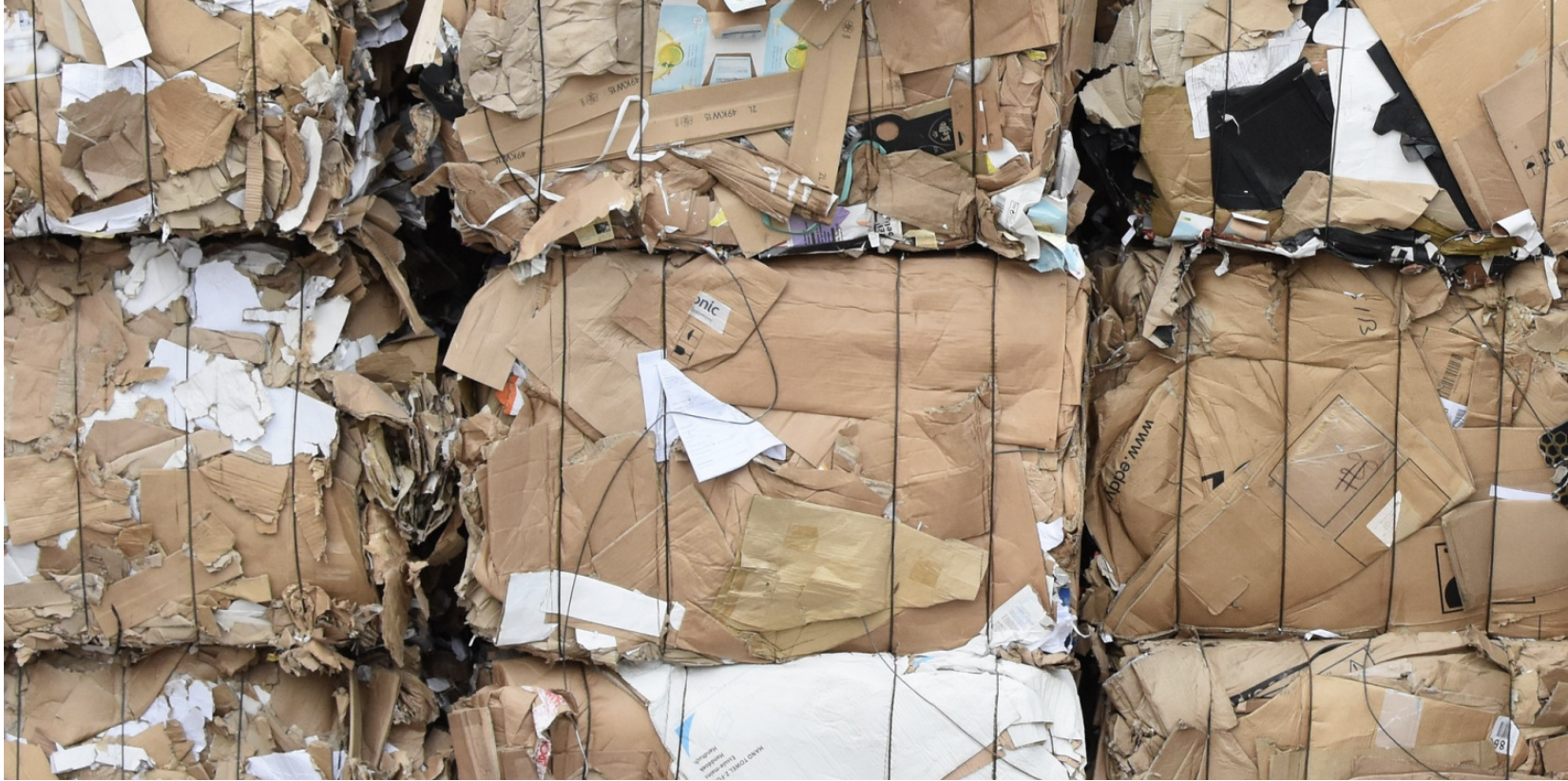
During the sunny and pleasant reunion weekend of June 7th and 8th, the Makerspace was bustling, offering tours and hands-on making experiences to over 200 Williams alums and their families. We prepared a hands-on project that would allow people to use 3D-printed molds to cast Makerspace-themed coasters, sourced from upcycled Amazon cardboard boxes. This fun experience allowed us to share and discuss an environmentally friendly DIY project that people could easily replicate at home. People can even create their own custom molds!

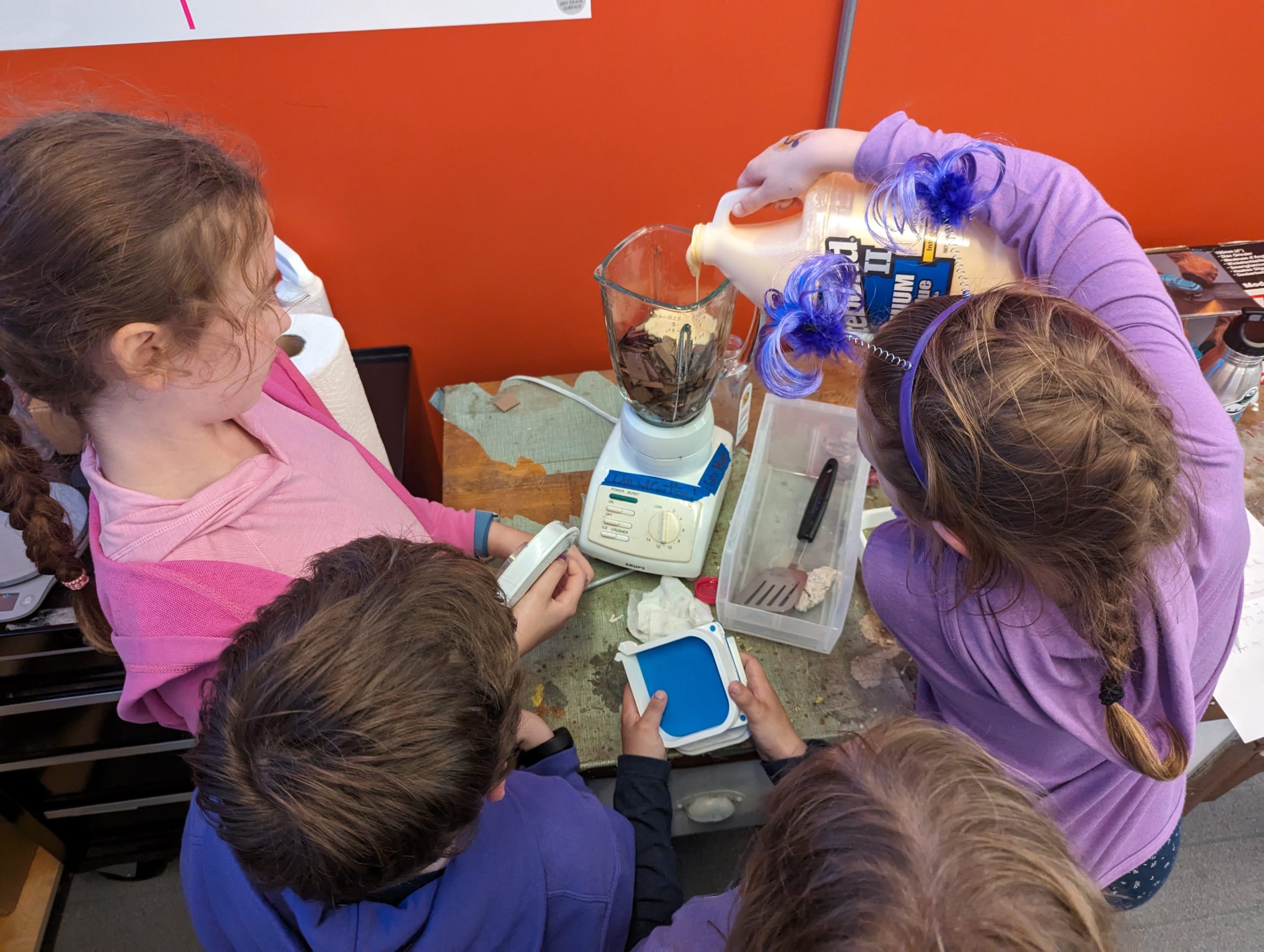
During the alumni reunion weekend, the kids seemed most excited to mix the ingredients, mold the pulp, and finally clamp the coasters. They also got to take home coasters that we had prepared (and dried!) ahead of time.

Alums in the Makerspace on June 7th, 2024

Alums in the Makerspace on June 7th, 2024

Recipe

  • Cardboard boxes (50g)
  • Water (170g)
  • PVA Glue (15g) (we used Titebond II woodworkers glue; Elmer’s white glue works, too)

Tools

Instructions

  • Cut the Amazon boxes into small pieces
  • Add into the blender: 50g of cardboard, 170g of water, and 15g of glue

    The kids were excited to mix the ingredients (cardboard, water, and glue)

    The kids were excited to mix the ingredients (cardboard, water, and glue)

  • Blend until it’s thick and looks like wet clay
  • Assemble the 3D-printed mold: we used and modified this Pulp-it model

    Kids took turns squeezing extra water from the pulp

    Kids took turns squeezing extra water from the pulp

  • Put the pulp in a cheese cloth and squeeze the excess water out
  • Fill the mold with the damp pulp
  • Press the pulp with your hands so that it is dense and evenly distributed in the mold

    And this is how you squeeze the clamps on the mold!

    And this is how you squeeze the clamps on the mold!

  • Attach the lid to the mold
  • Press the mold using a clamp
  • Let it dry for 24 hours
  • Carefully remove it from the mold and gently place it to dry in direct sunlight (or in front of a fan or heater vent) for about 6 hours
  • It should now be 100% dry and solid
  • Nice work!
Fusion 360 software: We ended up iterating and tried inverting the extrusion of our design. Which version do you like better?

Fusion 360 software: We ended up iterating and tried inverting the extrusion of our design. Which version do you like better?

The kids had a blast making the coasters while learning about how upcycling minimizes waste in our environment. This activity demonstrated how individual action, no matter how small, may collectively impact positive change.

A pile of upcycled coasters made by our alumni's children (from scrap Amazon boxes)

A pile of upcycled coasters made by our alumni’s children (from scrap Amazon boxes)

According to the Environmental Protection Agency

Packaging materials account for 28.1 percent of the total municipal solid waste (MSW), amounting to 82.2 million tons of generation in 2018. This amount poses a high environmental risk and requires systemic and individual actions to mitigate the risks.

A pile of Amazon boxes

A pile of Amazon boxes

We were inspired by this Pulp-it project, and then we modified their open-source parts by using Fusion 360 software to add the Makerspace logo onto the coaster. To do this, we added an image of the logo and then extruded (raised) it about 8mm. To minimize waste, we tested our prototype models by printing it at 15% of the actual size. 

Fusion 360 software: Before adding our logo

Fusion 360 software: Before adding our logo

Fusion 360 software: After adding our logo

Fusion 360 software: After adding our logo