Even if you use the Chrome GPO for settings, you need to set this for the home page of choice …
There is a registry setting in :
HKEY_LOCAL_MACHINE\SOFTWARE\Policies\Google\Chrome\RestoreOnStartupURLs
Even if you use the Chrome GPO for settings, you need to set this for the home page of choice …
There is a registry setting in :
HKEY_LOCAL_MACHINE\SOFTWARE\Policies\Google\Chrome\RestoreOnStartupURLs
Google Earth Pro is now free but when you load it is still wants you to register …
Use your email account at the username and GEPFREE as the license code.
For more details see:
https://support.google.com/earth/answer/176160?hl=en
On some computers like public access kiosks, you want to specifically lock certain firefox preferences so they can’t be changed. For a relatively easy way to do this, see the information at:
http://kb.mozillazine.org/Locking_preferences
Very useful when wondering if someone added something some where ….
Best run as root:
find / -name 'Acrobat*'
For VectorWorks we use a “dongle” attached to a network license server. To configure this on the clients use the “nethasp.ini” file pointed to our license server. That file needs to live in /etc on Macs and in the program directory on windows. For more information see:
http://kbase.vectorworks.net/questions/469/NetHASP.ini+Configuration+Guide
This is so easy that I forget how to do it !!!
Cut and paste your image onto the icon in the top left hand corner of the “Get Info” window for a file or folder.
For an example and for reference see:
http://www.maclife.com/article/howtos/how_create_your_own_custom_desktop_icons_mac_os_x
There appears to be an incompatibly between some installers, like SPSS, and Java version 1.6.0_51. The symptom is a blank screen when running the installer. Manually updating Java is the suggested fix.
For details see the link at: http://www-01.ibm.com/support/docview.wss?uid=swg21641495
Instructions for running the silent install on a mac are at:
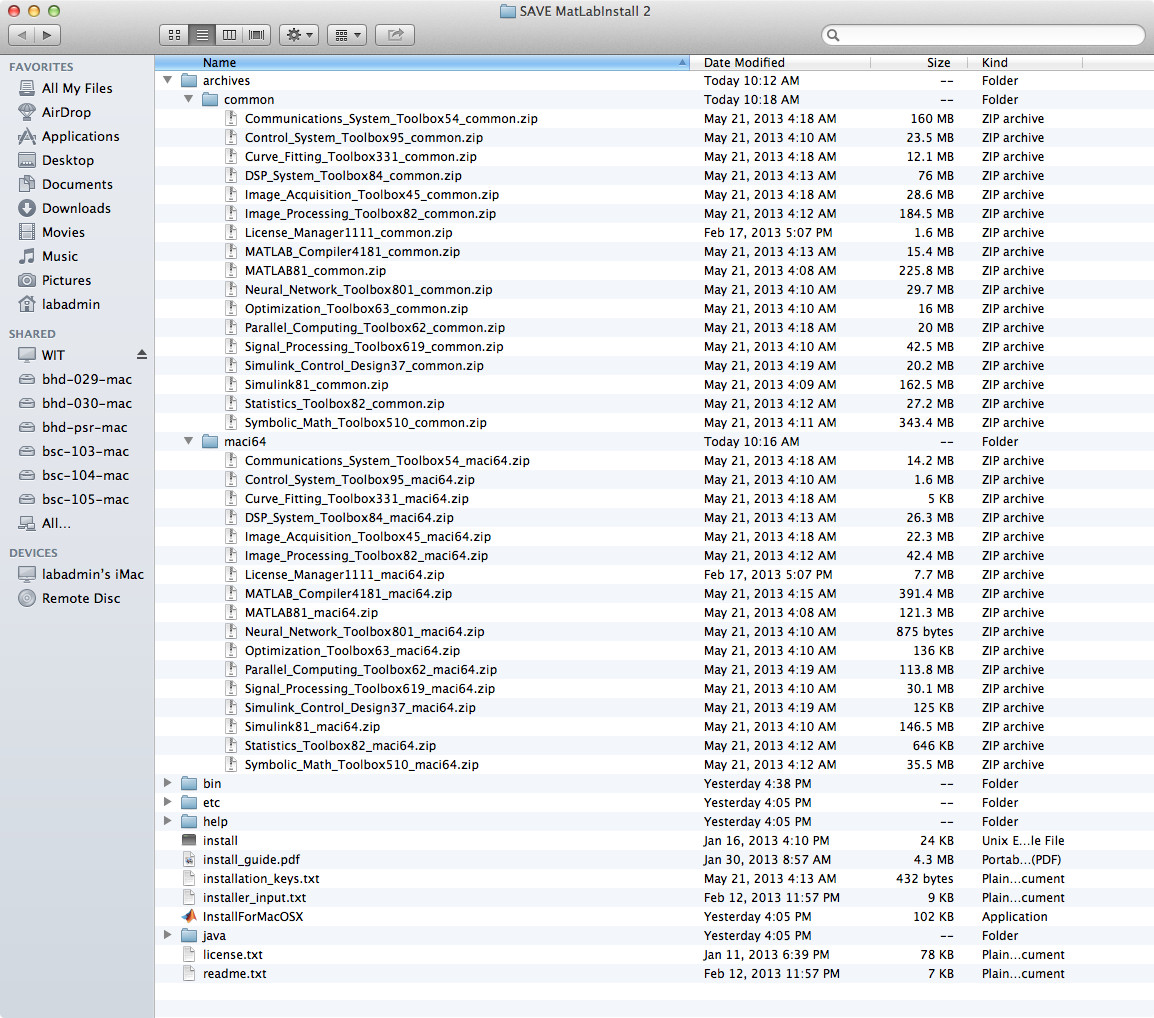
The MatLab distribution from MatWorks tries to save space on the disk and time for the download transfer. For the products you are licensed for they send you a “common” file and also a CPU-specific file. When installing MatLab on a particular CPU you need to format the “archives” folder carefully.
The archive folder should contain two other folders, “common” and, depending on your OS, one of “maci64″(Mac), “glnxa64” (linux), “win64” (windows).
For each product that needs to be installed there should be a zip file in the “common” folder and a corresponding zip file in the OS-specific folder. Leave these files in “zip” format. If they have been unzipped auto-magically by your browser or other download tools you’ll need to re-download them forcing them to remain “zip” files.
Example for a Mac:
Here is a screen capture of a install directory structure that works on a Mac:
Using this with the Language Lab in 2013 – 2014 while Sourena is away …
https://alefba.podio.com/lab-computers/