Some older Java-based websites are so out-of-date that Java refuses to run unless the web site is in the “excepted sites” list. This is normally a user-specific setting however you can set this up as a system wide exception list.
On windows —-
in c:\Program Files (x86)\Java\\lib\
(replace with the correct java release directory for your system)
place a file called “deployment.config”
deployment.system.config= file:///c:/williams/java/deployment.properties

deployment.system.config.mandatory=true
Then in c:\williams\java\
place a file called “deployment.properties”
deployment.webjava.enabled=true

deployment.security.level=MEDIUM

deployment.security.level.locked

deployment.user.security.exception.sites=c:\williams\java\exception.sites
(There are many, many properties you can use here …)
And in c:\williams\java\
place another file called “exception.sites”
http://phet.colorado.edu/

http://csi.chemie.tu-darmstadt.de/

http://winter.group.shef.ac.uk/
Once configured this way, you can update the excepted sites by pushing out a new “exception.sites” list to the computers.
For additional documentation see the websites at:
http://docs.oracle.com/javase/7/docs/technotes/guides/jweb/jcp/properties.html
http://www.adminarsenal.com/admin-arsenal-blog/manage-javas-control-panel-and-exception-site-list/
For Macs :
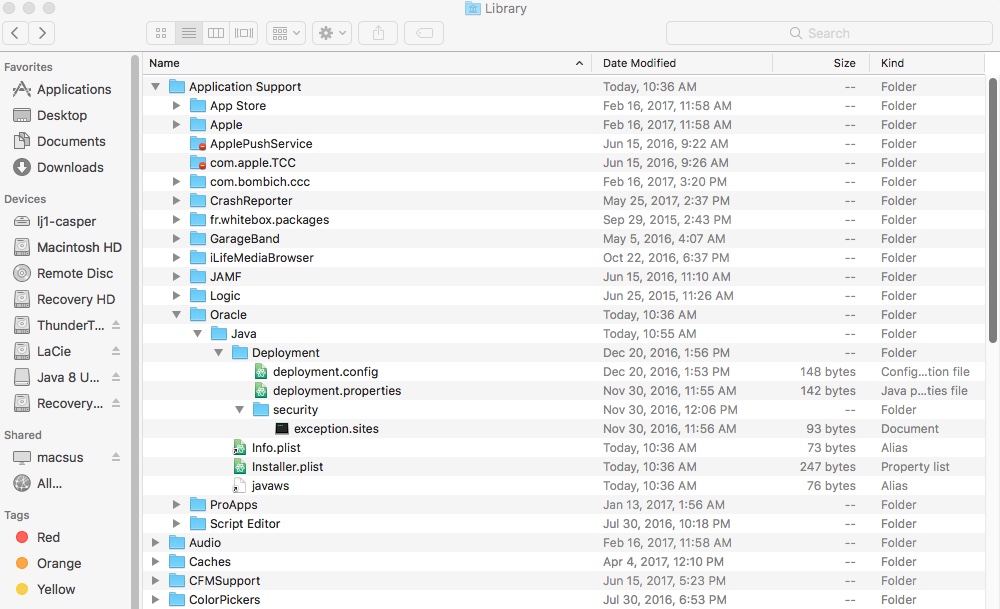
Create a folder called “Deployment” in: /Library/Application\ Support/Oracle/Java/
In that folder create another folder called “Security”
The files “deployment.properties” and “deployment.config” go in the “Deployment” folder, while the “exception.sites” file goes in the “Security” folder. Here is a screen shot of what you’ll have when you are done:
Keep in mind the Mac OS is always case sensitive on file names you should a plain text editor like “Atom” to edit these files (avoids RTF crap that TextEdit adds by default) and the URL file pointer for the deployment.config files looks like:
deployment.system.config=file:////Library/Application\ Support/Oracle/Java/Deployment/deployment.properties
For Williams College peeps – Current copies of these files can be found in macsus and JAMF.