Category Archives: Labs

Posts about computer labs and classrooms at Williams College

Dec 2011 – Imaging Log

Imaging with the Winter/Spring 2012 image on all computers in the following spaces is complete … Exceptions noted with issues listed at the end ….

Labs:

  • Bronfman 119
  • Harper GIS
  • Jesup B03
  • Jesup 101
  • Jesup 204
  • Jesup 207
  • Jesup 316a
  • Schow GIS

Lecterns:
(Individual computers in parenthesis need to be checked and/or imaged – see complete list of computers with issues below.)

  • Bernhard
  • Bronfman
  • Clark (Clk-105-pc not set to boot to network)
  • Griffin (gfn-002-mac needs to be checked)
  • Greylock (Greylock D – mac and pc are unresponsive and are likely “broken”)
  • Hollander (nab-040-pc not set to boot to network)
  • Hopkins (names change)
  • Jesup (jsp-205-pc to be replaced with dual-boot, jsp-206-pc not set to boot to network)
  • Lawrence
  • Paresky
  • Schapiro (sab-137-pc not set to boot to network)
  • TBL – Biology
  • TCL – Chemistry (tcl-206-pc not set to boot to network first)
  • TPL – Physics
  • Weston

Libraries:

  • Sawyer Classroom (swy-cls-03 not set to boot each morning)
  • Sawyer Lower Level Lab
  • Sawyer Main level (swy-bay-1 and swy-opn-28 need to be checked)
  • Schow Atrium (ssl-atrium-14 and ssl-atrium-24 not set to boot each morning)
  • Schow Classroom

Specific computers with issues:

These are likely unusable:

  • glk-d-mac and glk-d-pc — image process did not complete correctly, reboot to restart imaging process
  • swy-bay-01 and swy-opn-28 — image process did not complete correctly, reboot to restart imaging process

These are likely usable but will need to be checked and imaged in January:

  • clk-105-pc — not set to boot to network first
  • ctd-sem-pc — not on-line
  • gfn-002-mac — not on-line
  • jsp-206-pc — not set to boot to network first
  • nab-040-pc — not set to boot to network first
  • sab-137-pc — not set to boot to network first
  • spn-212-pc — not on-line
  • ssl-atrium-14 and ssl-atrium-24 — not set to boot each morning
  • swy-cls-03 — not set to boot each morning
  • tcl-206-pc — not set to boot to network first

Still to do:

  • CDE Lectern and lab – not till after winter study
  • Clark lab
  • ’62 CTD lectern and lab
  • Jesup 205 – not till January, photography image
  • Jesup 316 (3 of 7 still need to do)
  • Spencer lectern and labs
  • Physics lab (not till January)

Windows – NTLM Authentication Level

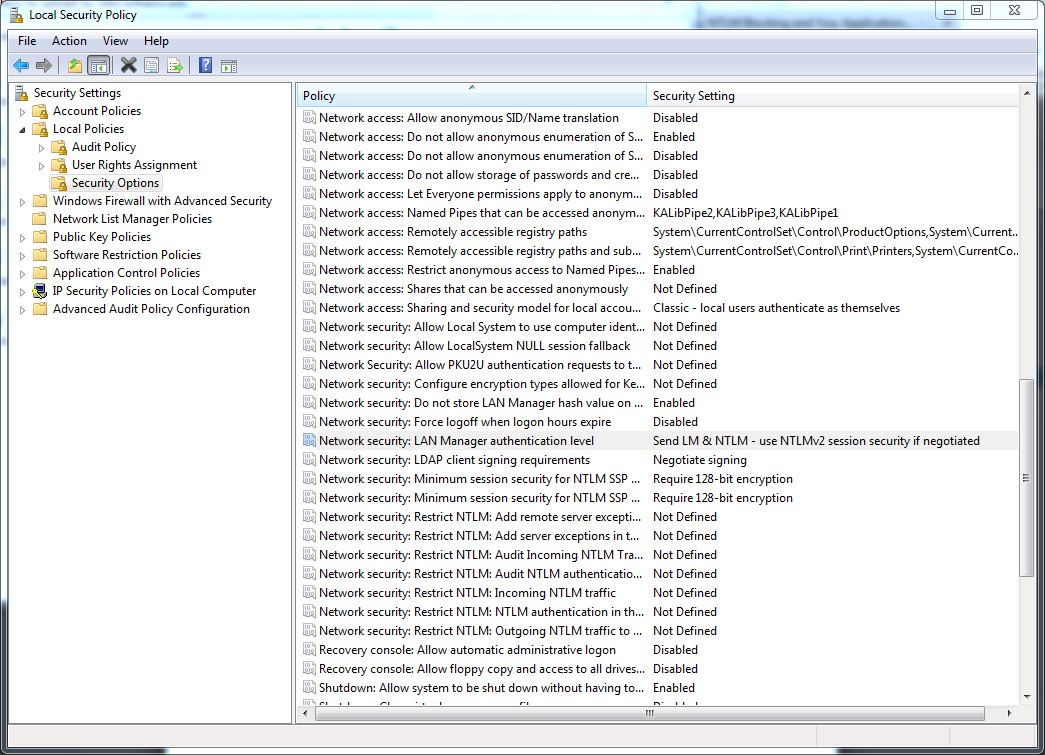
With the advent of Windows 7, Microsoft increased the default NTLM (a.ka. LAN Manager) authentication level required to connect to various network resources like file shares.  If you are running windows 7 and need to connect to older files shares you may need to lower the NTLM authentication on your computer to allow the connection.  If you are not able to log into the file shares from a windows 7 computer but are from other non-windows 7 computers,  try setting your LAN Manager  authentication level to …”Send LM & NTLM – use NTLMv2 session security if negotiated”

To do this  — In the Start menu search box type “Local Security Settings” (or look in the Administrative shortcuts) and then open the program …  this screen snip shows how to find this setting … no reboot is required …

Mac – Unmounting Windows (or any other) volume at startup

To umount a Macintosh volume at start-up (for example the windows bootcamp volume) you can create a startup item …

In:

/Library/StartupItems

Create a directory “Unmount”  in that directory you want to put 2 files:

Unmount

and

StartupParameters.plist


Unmount file is a shell script with the following contents:

#!/bin/sh
. /etc/rc.common
if [ “$1” == “start” ]
then
/usr/sbin/diskutil unmount /dev/diskXXX
fi

The /dev/diskXXX in this file you need to change.  My unmount command is actually …

/usr/sbin/diskutil unmount /dev/disk0s3

To find the correct information for your system run the command:

“diskutil  info /Volumes/Windows/”     —- or whatever the volume name is …

in the output you need to look for the “Device Node” .  Whatever it says for that Device Node is what you should put in the Unmount command in the shell script above.


StartupParameters.plist is a plist file that contains:

<?xml version=”1.0″ encoding=”UTF-8″?>
<!DOCTYPE plist PUBLIC “-//Apple Computer//DTD PLIST 1.0//EN”
“http://www.apple.com/DTDs/PropertyList-1.0.dtd”>
<plist version=”1.0″>
<dict>
<key>Description</key>
<string>Try to unmount the old disk</string>
<key>Provides</key>
<array>
<string>Unmount</string>
</array>
</dict>
</plist>


After creating the files, chmod them so that they are:

-rw-r–r–     StartupParameters.plist
-rwxr-xr-x   Unmount

Also, I set the owner and group to “root” and “wheel” respectively to match the other items in the /Library/StartupItems directory … (“chown -R root /Library/StartupItems/Unmount/” and “chgrp -R wheel /Library/StartupItems/Unmount/”)


For additional details see:

http://hints.macworld.com/article.php?story=2005052804075538


Windows – Launch program each time you login

To start a program each time you log into a windows computer …

  1. Create a shortcut to the program on the desktop (find the program in the program files folders and “right-click” on it …)
  2. Click on the Windows Start icon then “right-click ” on Programs and select Open
  3. Double click on the “Programs” folder and then on the “Startup” folder
  4. Copy or move the shortcut you created in the first step to this “Startup” folder

Software – GIS Idrisi

To install Taiga Idrisi software correctly ….

  1. Install the software
  2. Run as Admin the License Manager and enter information for network client: \\lm2\taiga\taiga
  3. Run as Admin the Application once to have the license stick

Mac – AD Authentication to non-primary domain controllers details

Here are some details on how to make sure your non-primary AD authentication servers are available to macs running snow leopard …

This comes from the MACENTERPRISE list which always provides a wealth of information for people who support Macs …

======================================

Subject: Re: Mac Login issue
From: Tim Perfitt
Reply-To: Mac OS X enterprise deployment project
Date: Wed, 23 Feb 2011 20:14:28 -0600
Content-Type: text/plain
Parts/Attachments:

text/plain (64 lines)

There is no way to manually enter in the DCs, as this information is based on site. The important thing to check is that the SRV records for the DCs that are in your site are advertised at the top level of AD DNS as well. You can see which DCs are available by turning on verbose DS logging and looking at the logs:

sudo defaults write /Library/Preferences/DirectoryService/DirectoryServiceDebug “Debug Logging Priority Level” -integer 7
sudo touch /Library/Preferences/DirectoryService/.DSLogDebugAtStart
sudo killall DirectoryService

open Console and filter on “tory:” for this log: /Library/Logs/DirectoryService/DirectoryService.debug.log

You should see some lines like these:

2011-02-23 19:26:38 CST – T[0x0000000101981000] – Active Directory: Processing Site Search with found IP
2011-02-23 19:26:47 CST – T[0x0000000101981000] – Active Directory: Site found of – Default-First-Site-Name
2011-02-23 19:26:47 CST – T[0x0000000101981000] – Active Directory: Adding Server –

In order for a DC to be used, it must :

1. Have ldap and kerberos service records in the site specific DNS service records (_ldap._tcp.sitename._sites.dc._msdcs.domain.name and _kerberos._tcp.sitename._sites.dc._msdcs.domain.name)
2. Have its kpassword service records in the top level dns records (_kpasswd._tcp.domain.name)

If a DC fails either of those tests, it is not used. If you see “Adding Server – “, you know that it passed those tests and would be used in case of a failure and for load balancing.

The rules for GC are a bit different, since it doesn’t care about _kerberos or _kpassword (GCs aren’t used to to authenticate users or change passwords). The important thing for GCs is that the _ldap records are in the site specific DNS entries (_ldap._tcp.sitename._sites.gc._msdcs.domain.name). Again, if you see “Adding Server” in the GC section:

2011-02-23 19:26:51 CST – T[0x0000000101C10000] – Active Directory: Global Catalogs – Start checking servers for site “Default-First-Site-Name”

then you know it passed that test.

HTH,

tim

On Feb 23, 2011, at 11:15 AM, Logston, Alan wrote:

> When I came into work this morning and got a call that an entire Mac instructional lab would not allow domain/Student logins. Soon I got three more calls complaining of the dame situation all over campus. There was a very small handful of Macs able to authenticate and all the PCs were still logging in just fine.
>
> I dug into the problem and discovered that the Domain controller DC-1 was down. The PCs were falling back to other servers to authenticate but the Macs were only trying to authenticate to DC-1
>
> In the “Directory Utility” I have “Prefer this domain server” Blank. I thought this would make it so the Mac would auto discover the other authentication servers like the PCs.
>
>
> Is there any way I can manually enter these severs so this problem will not happen again?
>
>
>
> Thanks,
>
>
> Alan
> ITS
>
>

Windows – AD Management with PowerShell

Apparently, it is now possible to manage the AD with PowerShell. Since the GUI for active domain users and computers can typically only make changes one account at a time, this powershell access could be handy when you have to manipulate multiple accounts at once:

http://www.scriptlogic.com/smbit/article/track-user-password-expiration-using-active-directory?elq_mid=2220&elq_cid=786672&elq=938d349e11c845d681800dccd9b9246a

Mac – DVD region code

It seems that it isn’t possible to set the DVD region code in mass on newly deployed mac hardware. What you can do however is change an authorization file to allow unprivileged users to set the region code initially. (Changing the region code after the initial setting is another matter and will continue to require admin privs)

To allow non-privileged user accounts to set the region code initially edit:
/etc/authorization

Look for “DVD” and edit that section so that it reads “allow”
(you can edit a copy of this file with textedit or with a plist editor, then copy the new version into place …)

Here is a sample of what you are looking to do …

    <key>system.device.dvd.setregion.initial</key>
<dict>
<key>class</key>
<string>allow</string>
<key>comment</key>
<string>Used by the DVD player to set the region code the first time.  Note that changing the region code after it has been set requires a different right (system.device.dvd.setregion.change).</string>
<key>group</key>
<string>admin</string>
<key>shared</key>
<true/>
</dict>