Category Archives: Labs

Posts about computer labs and classrooms at Williams College

Bootcamp – Stop Bootcamp Help window popup

On a windows install using bootcamp on the Mac, users will see an annoying bootcamp help dialog box which isn’t really helpful at all to them. Lab users have no permissions to do anything with bootcamp so showing them this window is pointless.

From an admin login use:
msconfig (enter in the start search box)
to edit the start items and uncheck bootcamp …

Mac – Symbol Font

There seems to be a corrupted symbol font that keeps coming back on our mac images. It ends up in /Library/Fonts in a file called “Symbol”. In July 2012 this appeared after installing MathType …

I have found that too allow microsoft office apps like powerpoint to correctly display Greek characters in mathematical equations, I have to delete the file:

/Library/Fonts/Symbol

Mac – DeployStudio and AD join

Deploying a Mac OS image and adding the computer to the AD can all be accomplished using DeployStudio. I suggest that you set up your AD environment to use “OUs” (organizational units) for your computers rather than have them all in the one default “computers” OU. I have two production OUs of “Labs” and “Labs-Macs”. I’ll explain the “Labs” OU structure for windows in a different post …. For now, just add computer accounts for all your macs to an OU. The computer accounts should match exactly the host names you are using just like you would do for windows.

Then in DeployStudio –
Add the computers and set their “Local Hostname” and “Computer Name” to the same thing you entered in the AD for their computer accounts. Your workflow for the deployment should include a step to rename the mac and after that step the AD binding. In that AD binding window be sure to set the fields for the domain to join and the computers node. Here is a screen shot of my set-up …

Mac – DeployStudio and windows volume

When creating a workflow for taking a DeployStudio image of a windows NTFS volume — it is important to uncheck the box for use “mac tools for multicast” which then allows you to check the box for “try to shrink the NTFS volume before taking image”. If you do not shrink the volume the imaging process will fail with an error about not being able to change the partition size.

Watch for this setting since it can revert back to the default “multicast” setting, which does not work, when you upgrade the DeployStudio software

For more details see:
http://deploystudio.wikispaces.com/Creating+a+NTFS+Master+Image+on+Bootcamp+2.x

Bootcamp – Hiding Mac volume from Windows

Reports are that since Bootcamp version 3 or so you can now read and write to the macintosh partition from your windows environment. This is less than ideal in a shared computer lab.

Renaming the file:
c:\windows\system32\drivers\applemnt.sys
and then restarting should disable the mount of the macintosh partition in windows …

For more discussion and details see:
https://discussions.apple.com/message/11226479?messageID=11226479#11226479?messageID=11226479

Windos 7 – GPO – Printing

Previously, printer mappings for multiple users on a single windows computer was a bit difficult. In order to make the print queues available to multiple users you would have to use some arcane “RUNDLL’ command lines.

Now a set of group policy settings can be employed to map printers based on a variety of factors. A great store of information about this can be found at:
http://www.grouppolicy.biz/tag/printer/

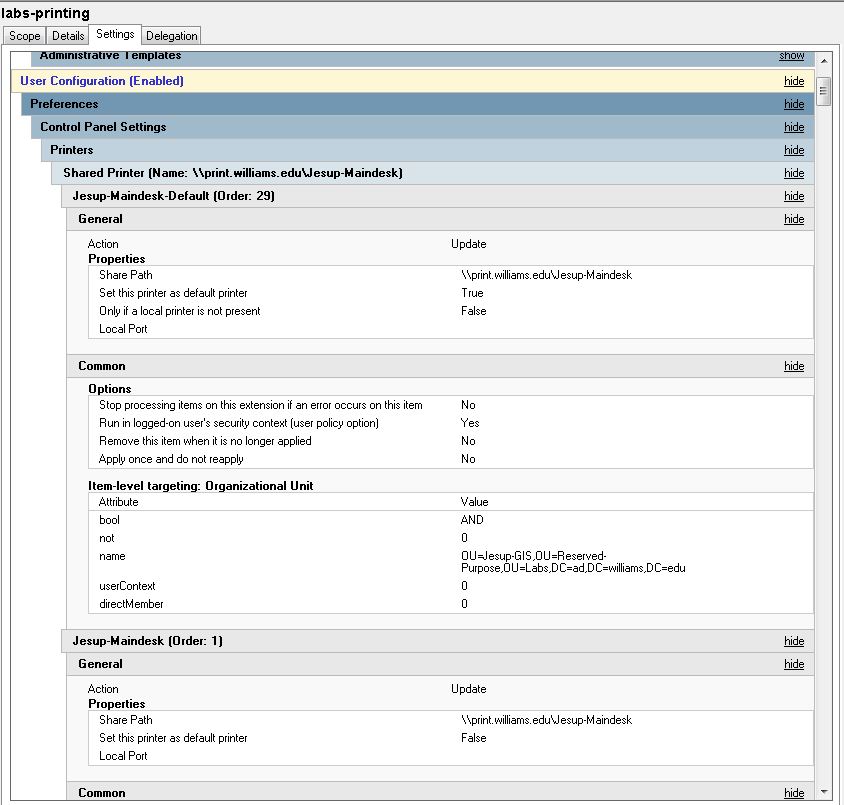
How I have set this up in our GPO looks like the following:
Policies ….

Preferences …
(There are quite a few more of these then what is shown here. You need at least one for each of print queues needed in the labs.)

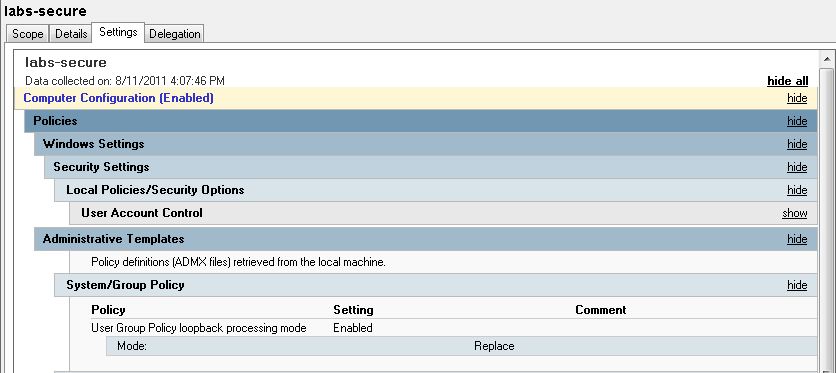
One last setting is crucial – “Loopback processing” must be enabled in:
Computer Configuration — Administrative Templates — System/Group Policy

Windows 7 – GPO – Power Management

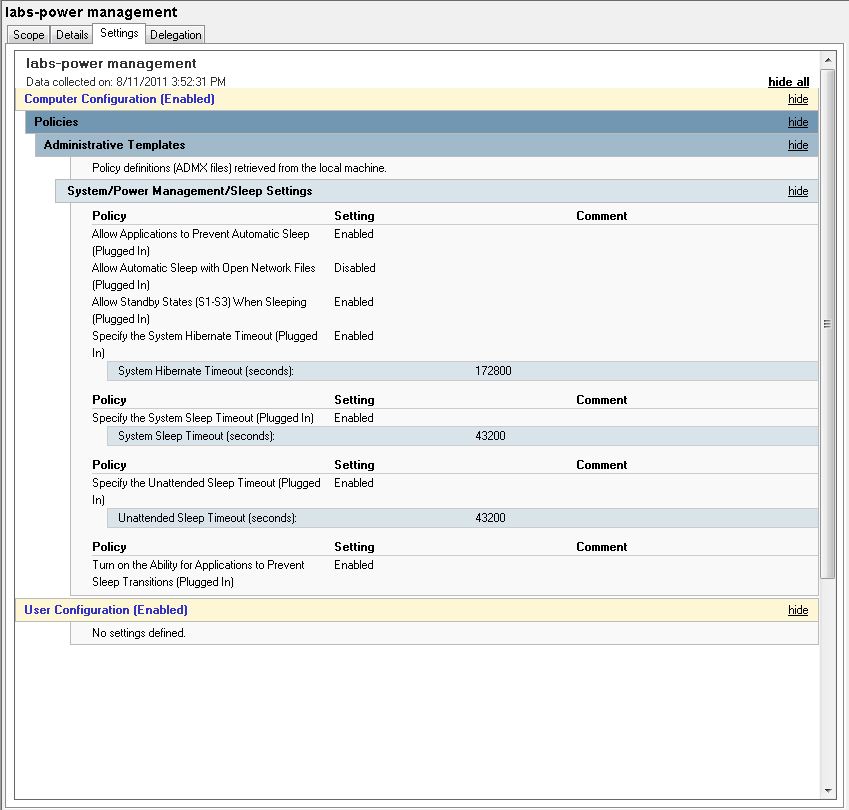
Using group policy settings I can manage when computers go to sleep, etc. I also have a KACE 1000 management server which allows me to shutdown computers on a particular schedule. Lastly, most of my computers are set to boot automatically at a certain time in the morning. So – with a combination of these tools – I can shutdown and turn on the computers in different places depending on needs. One set of computers may need to be on till 2:30 am while another set can be shut off at 4:30 pm, etc.

Windos 7 – GPO – DNS Settings

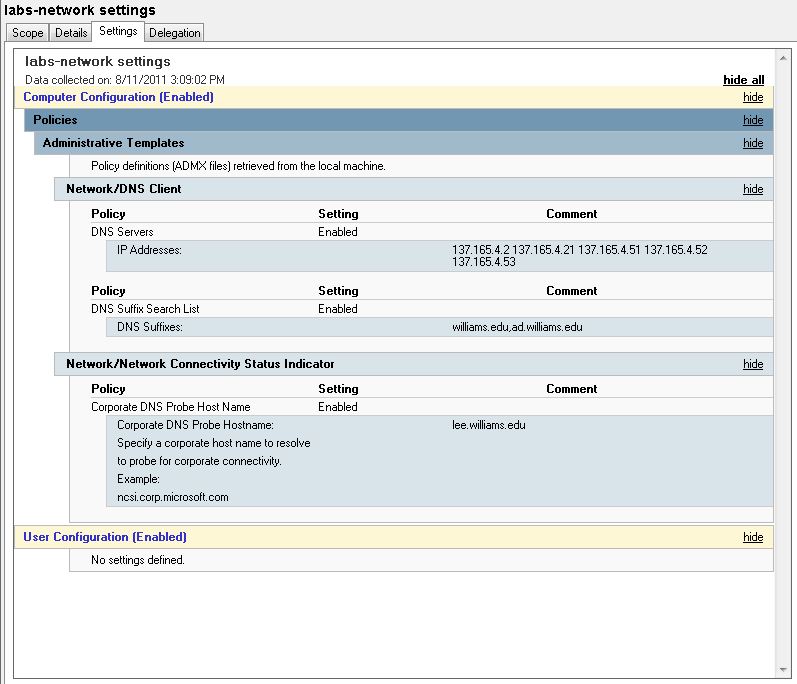
Theoretically, the DHCP servers should feed the correct information for DNS to windows 7 clients. Unfortunately, presently, I am experiencing an increased occurrence of DNS related troubles on my subnets. That is putting a “hitch in my giddy-up” as they say for imaging computers for the new semester …

To mitigate the trouble I am adding static information to DNS settings using a group policy setting … This doesn’t fix imaging but it will allow people to use the computers with more reliability once they are imaged …. To get the imaging done I can revert to using local hard drives if I have to …
Also, static entries are being added to the bottom of the “Hosts” file in: c:\windows\system32\drivers\etc

# Settings added to mitigate DNS drops – summer 2011 – Lynna
127.0.0.1 localhost
137.165.4.2 lee.williams.edu
137.165.4.21 lenox.williams.edu